Building a writing assistant
A Mac utility that rewrites any selected text with a shortcut and how I built it.
The problem I was actually having
I'm not a native English speaker, so my writing isn't always perfect. At some point my most-used AI prompt became "rewrite this text, fix all mistakes, and make it sound natural." But the process of opening a chat, asking for a rewrite, and then copying and pasting back into Slack took too long.
I tried other solutions too, but they didn't quite fit my workflow.
I wanted a keyboard shortcut that automatically rewrites the text I just typed. So in August 2024, I built v1 for myself.
v1: primitive, private, and used every day for a year
The first version looked pretty primitive. The goal was a function, and it worked quite well. I could select text anywhere on macOS, press ⌃R, and get a rewrite back in place.
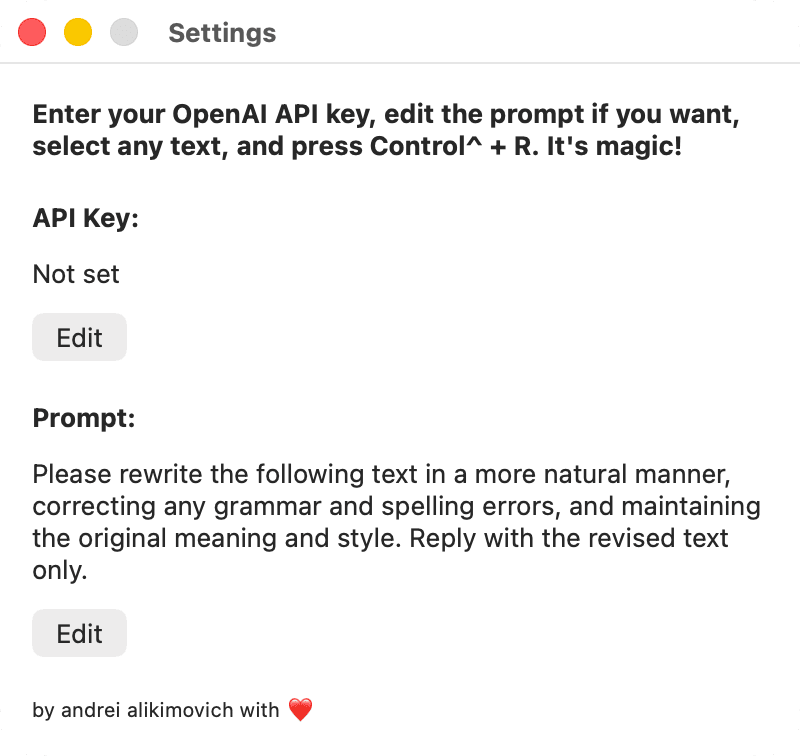
I tried to get it on the App Store, but it didn't work out. It turned out I would have needed to rewrite the entire thing, and I just didn't have the time or energy to do that back then. And I just kept using it privately for about a year.
The restart: September 2025
My daughter started daycare and I got a few hours back that I hadn't had in a long time. By then AI was capable enough to be a real co-developer. We were in the ChatGPT 4.5 era, very cool but not yet February 2026. The app I'd been using for a year was still primitive, un-shippable, and still the thing I reached for every day. And since I liked it so much, I figured I'd try to share it with others.
The Electron detour
I wanted to make the app more delightful, which was a fun challenge because the tool doesn't have a visible UI. I didn't want to learn a whole new tech stack, so I picked Electron. I quickly built a working v2 prototype, but then I ran into some problems. I wanted to put the app on the Mac App Store, but Apple doesn't really like Electron apps, especially ones that use system's accessibility features. I could have published it outside the store, but I really wanted to be on it. Rewriting the app felt easier than trying to handle updates, sales, and licensing by myself.
So, I ditched the Electron version and started over using native Swift.
how do you show progress in an app with no UI?
I'll skip the part about building it since it isn't very interesting. I mostly just used Cursor and played around with different models, building on top of the code I already had from the first version of the product.
The interesting part was getting feedback from my friends and family who tested the app.
One of the issues they found was that they couldn't easily see the rewrite happening, which meant that when they hit the shortcut they didn't know whether the rewrite was in progress or something was stuck. I'd gotten so used to the original version of the product that I just didn't see this problem.
Scraib has almost no interface. It lives in the menu bar. The whole point is that you press the shortcut and the rewrite happens. But "the rewrite happens" takes a second or two, sometimes longer if the text is long or the model responds slowly. During that time, two things can go wrong:
- The user starts typing something else, and the new text ends up in an unexpected place.
- The request fails silently (no internet, out of tokens, bad API key) and the user is left staring at their original text, not knowing whether anything happened at all.
So I needed a way to communicate states like something is happening or something failed without putting up a window that would yank the user out of whatever they were doing.
I explored a few surfaces:
Centered overlay. A small status panel in the middle of the screen. But it turned out to be distracting. The whole point of Scraib is that it stays out of your way, and a popup in the middle of your monitor breaks that promise.
Toolbar / menu bar indicator. Already there, nothing new to introduce, but it's far from where the user is looking. People kept missing it entirely.
A static Wispr-style island near the menu bar. Better than the toolbar but still in the wrong place.
The cursor. That's where user's attention already is.
I went with the cursor. The first version was just a spinner attached to the pointer while the rewrite was in flight. That solved the "is anything happening?" problem on day one. And to communicate status better, I added a short message close to it.
This solution scaled well. When I added translation, I used the same cursor text to show what kind of rewrite was happening ("Translating", "Rewriting", and so on). When I added custom rules per app, I could tell the user that the app's custom rules were being applied. And the app still stayed out of the user's way and let them keep their context.
Tooling: building it with AI
I built v2 mostly through Cursor. The thing Cursor gave me that mattered most was the ability to switch models mid-project and see which one was actually better at the task in front of me.
The surprise was that Gemini was meaningfully better at Swift and SwiftUI than anything else I tried. ChatGPT and Composer handled Node.js and the server much better, and were cheaper than the rest. I rarely used Claude back then because of how pricey it was.
Launch: November 14, 2025
After a few rounds of trying to publish on the App Store, I finally launched on Product Hunt on November 14, 2025, and finished #3 product of the day with 314 upvotes (Product Hunt page).
And with that, Scraib became a thing other people were actually using.
now
I have a small but loyal user base of around 200 users. People who installed Scraib at launch still send me feedback, feature requests, edge cases, and the occasional bug. These days I mostly use it as a playground for new ideas and a way to learn about building with and on top of models.
If you want to try the app, check it out here: scraib.app, there is a 7 day free trial.